
SOC Analyst Roadmap: Skills, Tools, and a 90-Day Practice Plan
Updated on March 09, 202614 minutes read
A SOC Analyst role is one of the most practical ways to break into cybersecurity, especially if you're changing careers or building skills alongside a full-time job. The challenge is that most beginners do not know what to learn first, which tools actually matter, or how to practice in a way that looks credible to employers.
This roadmap gives you a clear learning sequence, a realistic tool stack, and a 90-day practice plan that builds job-ready ability step by step. You'll focus on fundamentals, hands-on investigations, and portfolio-ready write-ups that show you can do SOC work.
What a SOC Analyst Does (And Why It's a Smart Entry Point)

A Security Operations Center (SOC) monitors systems, networks, and endpoints for signs of attacks. SOC Analysts investigate alerts, separate real issues from noise, and help stop incidents before they become major breaches.
This role is a strong entry point because you learn real-world security workflows quickly. You will work with logs, detections, endpoint data, and threat intelligence every week, building a foundation for roles like incident response, threat hunting, or cloud security.
SOC Analyst tiers in simple terms
Most SOC teams have different levels of responsibility. Tier 1 focuses on alert triage and initial investigation, while Tier 2 handles deeper analysis and response steps, and Tier 3 often includes threat hunting and detection engineering.
If you're aiming for your first job, your target is usually Tier 1. The roadmap in this article is built to make you effective at Tier 1 and ready to grow into Tier 2 skills over time.
The Skills That Make Up a Strong SOC Analyst Roadmap
SOC analysts do not succeed by memorizing random tools. They succeed by understanding how systems behave, how attacks show up in logs, and how to follow a repeatable investigation process.
The best way to learn is to build fundamentals first, then apply them through real practice. That is why this roadmap prioritizes networking, operating systems, log analysis, and clear reporting before advanced specializations.
Networking fundamentals you actually need
SOC work constantly involves reading traffic behavior and figuring out whether it makes sense. If you cannot interpret a suspicious connection or explain why DNS matters, investigations become guesswork.
Start with IP addressing, TCP vs UDP, and common ports like 80, 443, 53, 22, and 3389. Learn how DNS requests work, what HTTP status codes mean, and why proxies or VPNs can change what you see in logs.
Windows fundamentals for SOC investigations
Many organizations are Windows-heavy, so understanding Windows logs is a big advantage. You do not need to be a Windows admin, but you do need to recognize authentication events and suspicious behavior patterns.
Get familiar with Event Viewer, Security logs, and the idea of "who did what, from where, and when." Learn common artifacts like scheduled tasks, services, and basic registry concepts tied to persistence.
Linux fundamentals for SOC investigations
Linux appears everywhere in modern tech, from servers to containers and cloud environments. SOC analysts often investigate SSH logins, suspicious processes, and unexpected network connections on Linux hosts.
Learn essential commands like ps, top, journalctl, grep, and ss. Focus on reading auth logs and building the habit of quickly checking users, processes, and network activity in a structured way.
Log analysis mindset: the skill that unlocks tools
SIEM platforms, EDR consoles, and dashboards are only useful if you can interpret the data they provide. Your real power comes from being able to turn log fragments into a narrative you can defend with evidence.
Train yourself to ask investigative questions like: "Is this login normal for this user?", "What happened right before the alert?", and "What changed on the machine?" This mindset makes every tool easier to learn.
Security fundamentals and attack stages
You'll investigate better when you understand what attackers try to achieve. Even basic knowledge of phishing, malware behavior, and credential abuse will help you recognize patterns faster.
Learn the stages of an attack using simple frameworks like the Kill Chain or MITRE ATT&CK. Focus on tactics like initial access, execution, persistence, privilege escalation, and command-and-control.
Basic scripting to speed up your work
You do not need to be a programmer, but you should be able to automate small tasks. Scripting helps you parse logs, clean data, and move faster during investigations.
Start with Python for JSON, regex, and log parsing. Add basic Bash for Linux workflows, and learn enough PowerShell to understand common commands that appear in Windows security incidents.
Documentation and communication skills
SOC work is teamwork, and teams need clear notes. If your ticket updates are confusing, incidents take longer to resolve and senior analysts cannot trust your triage.
Practice writing short, structured summaries with facts, impact, evidence, and next steps. Strong communication makes you look experienced even as a junior candidate.
SOC Analyst Tools to Learn (In the Right Order)
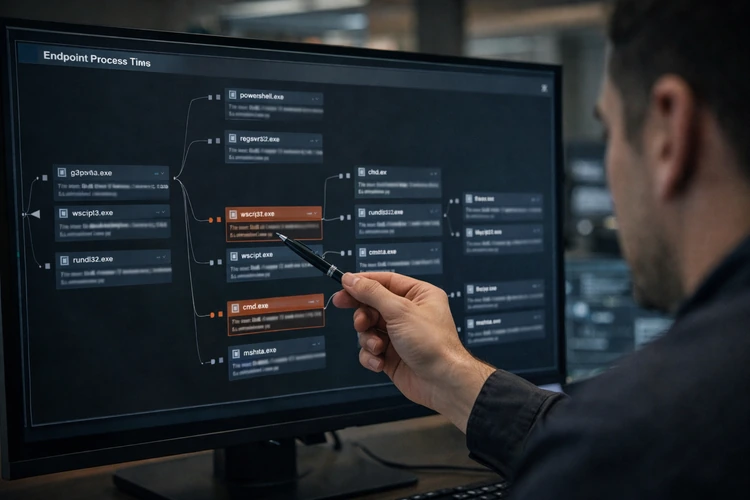
Tools vary between companies, but the workflow is consistent: monitor, investigate, enrich, document, and respond. Learning tools in the right sequence prevents overwhelm and helps you connect the dots.
Your goal is not to master every platform. Your goal is to be comfortable with the categories of tools SOC teams use and understand what each tool is meant to answer.
SIEM tools: your investigation search engine
A SIEM collects logs and helps analysts search, correlate, and alert on suspicious behavior. In many SOC roles, SIEM time is a big part of your day because it's where alerts and investigations begin.
Popular SIEMs include Splunk, Microsoft Sentinel, Elastic, and QRadar. Focus on building queries, filtering by time and host, and learning to pivot from one clue to the next.
EDR/XDR tools: what happened on the endpoint
EDR platforms show process activity, network connections, file changes, and more on laptops and servers. These tools are often where you confirm whether an alert is real and how far it spread.
Learn to read process trees, identify suspicious parent-child relationships, and interpret command-line activity. You should also understand basic containment actions like isolation and quarantine at a high level.
Network analysis tools: proving suspicious traffic

Network tools help you validate what's happening across connections, protocols, and domains. Even basic PCAP analysis can help you confirm malware downloads, beaconing, or unusual DNS behavior.
Wireshark is a strong starting point because it teaches you how to interpret raw network evidence. Learn how to follow streams, identify DNS queries, and spot repeating patterns that do not look normal.
Threat intelligence tools: context for your indicators
Threat intel enrichment helps you understand whether an IP, domain, or hash is known for malicious behavior. It also helps you prioritize which alerts require urgent attention.
Use tools like VirusTotal, AbuseIPDB, and vendor advisories to enrich indicators. Learn the difference between "reputation suggests risk" and "evidence confirms compromise," so you avoid false conclusions.
Ticketing and case management tools
SOC work is documented through tickets, case notes, and incident reports. Employers want analysts who can keep clean timelines and provide clear escalation notes.
Practice writing updates that include what you checked, what you found, and what you recommend. Good documentation makes your work usable to the rest of the security team.
SOAR: automation basics
SOAR tools automate repetitive tasks like enrichment, alert grouping, and response playbooks. You do not need deep SOAR expertise at the beginning, but you should understand why automation matters. Learn what a playbook is, what steps can be automated, and how mistakes can scale if false positives trigger automated actions. That awareness is valuable in interviews.
How to Build a Home SOC Lab Without Overcomplicating It
A home lab helps you practice investigations without waiting for real-world access. The best lab is simple enough to maintain and structured enough to repeat experiments. You can build a lab with one Windows VM, one Linux VM, and a place to collect logs. Your goal is to generate activity, collect evidence, and practice telling the story.
A practical starter lab setup
Use VirtualBox or VMware Player and create a Windows VM and a Linux VM. If your machine can handle it, add a third VM for log collection or a lightweight SIEM option. Keep your lab focused on learning outcomes, not perfect architecture. When you can reliably reproduce events and analyze them, you're building real SOC skill.
What you should do in your lab each week
Generate logins, failed logins, installs, and simple scripts so you have data to investigate. Capture a small PCAP and practice tracing a web request or DNS lookup. Most importantly, write down what you did and what it means. Those write-ups become portfolio material and interview talking points.
Portfolio Projects That Actually Help You Get a SOC Interview
A SOC portfolio should show how you think under uncertainty. Employers love candidates who can explain an investigation clearly, even if the scenario is simple. Aim for 3 to 5 small artifacts that demonstrate log reasoning, investigation workflow, and professional reporting. Your portfolio is proof of skill, not a collection of buzzwords.
Project 1: SIEM-style investigation case study
Create a scenario like repeated failed logins followed by a successful login. Collect the logs, investigate what happened, and write a short report. Include the timeline, your evidence, your conclusion, and recommended next steps. This mirrors real SOC work and shows your analytical structure.
Project 2: Build three basic detections
Write detection logic for patterns like brute force attempts, suspicious PowerShell behavior, or new admin account creation. Explain what triggers the alert and what data fields you rely on. Even if you are not using an enterprise SIEM, you can document the query logic and how you tested it. That is exactly what junior analysts do on the job.
Project 3: PCAP analysis report
Analyze a small PCAP and explain what you observed in plain language. Identify DNS lookups, web connections, and anything unusual like repeated beacon-like traffic. A good PCAP report includes screenshots, clear steps, and a confident conclusion. This project helps you stand out because many beginners avoid network analysis.
Project 4: Threat intel enrichment workflow
Create a checklist or simple script that takes an IP, domain, or hash and returns basic context. Summarize what you would do next depending on the results. This demonstrates operational maturity because you are not just checking a tool. You are making a decision based on evidence and risk.
The 90-Day Practice Plan (Structured for Busy Adults)
This plan assumes you can study about 60 to 90 minutes per day, around five days a week. If you have more time, you can move faster, but do not skip the sequence. The goal is to build a repeatable SOC workflow: understand the environment, investigate alerts, enrich evidence, document clearly, and escalate appropriately.
Days 1 to 30: Foundations and log thinking
In the first month, focus on networking basics, Windows and Linux logs, and simple security fundamentals. This stage builds your "reading comprehension" for systems and attackers. Your output should be short notes, checklists, and mini-guides you can reuse. By day 30, you should be able to look at login activity and explain whether it's suspicious.
Days 31 to 60: SIEM workflow, detections, and investigations
In the second month, practice searching logs like an analyst. Build queries, pivot through evidence, and learn to create simple detection logic based on patterns you understand. Your goal is to complete at least two documented investigations and write three detections with test results. This becomes the core of your SOC portfolio.
Days 61 to 90: Incident response mindset, portfolio polish, and job prep
In the final month, focus on incident response basics and professional documentation. Create a mini playbook for common scenarios like phishing, malware, or suspicious login activity. Then polish your portfolio and prep for interviews by practicing how you explain your investigations. By day 90, you should have 3 to 5 strong artifacts you can walk through confidently.
Weekly Breakdown You Can Follow Immediately
Week 1: Networking essentials
Learn common ports, DNS flow, and HTTP basics. Practice identifying what a log line means when it references an IP, domain, or protocol. Write a one-page cheat sheet of ports and "what to check next" questions. This becomes your quick reference throughout the plan.
Week 2: Linux fundamentals for SOC
Practice reading authentication logs and checking users, processes, and network connections. Focus on building a routine so you always know what to check first, second, and third. Create a Linux triage checklist you can run through quickly. In interviews, this shows you have a process, not just knowledge.
Week 3: Windows logging and authentication basics
Explore Windows Security logs and learn what successful vs failed logins look like. Practice identifying suspicious patterns like unusual login times or repeated failures. Write a short Windows authentication investigation guide with key questions and example evidence. That document can later become a portfolio artifact.
Week 4: Threat fundamentals and attacker behavior
Learn the basics of phishing, malware stages, and persistence concepts. Map simple behaviors to MITRE ATT&CK tactics to understand attacker intent. Create a one-page summary of the attack lifecycle and how it shows up in logs. This helps you connect tools to real threats.
Week 5: SIEM thinking and log searches
Start practicing with SIEM-like queries and filters. Focus on time ranges, user filtering, host filtering, and pivoting to related events. Save at least 10 practice queries and document what each query is meant to answer. This becomes evidence of skill, not just practice.
Week 6: Detection logic
Write two detections for behaviors you now understand, like brute force attempts or suspicious scripting. Keep detections simple and explain the reasoning. Test your detections by generating sample events in your lab. Document how you validated the signal and what false positives might look like.
Week 7: Full investigation workflow
Choose a scenario and do a full investigation from start to finish. Build a timeline, collect evidence, enrich indicators, and write a conclusion. Your deliverable is a case study report written like a SOC ticket summary. This is one of the strongest items you can show recruiters.
Week 8: PCAP analysis
Capture or use a practice PCAP and analyze it with Wireshark. Look for DNS queries, HTTP traffic, and anything that looks repetitive or suspicious. Write a short report with screenshots and clear explanations. Even a basic PCAP report shows strong fundamentals.
Week 9: Endpoint investigations
Practice interpreting endpoint behavior using process trees and command lines. Focus on suspicious parent-child relationships and persistence clues. Create an endpoint triage checklist and a sample write-up. This helps you talk confidently about EDR concepts in interviews.
Week 10: Threat intelligence enrichment
Practice enriching IOCs with reputation checks and vendor resources. Learn to avoid overconfidence by separating "suspicious" from "confirmed malicious." Create a repeatable enrichment workflow document you can follow during investigations. Consistency is what employers want from junior analysts.
Week 11: Incident response basics
Build a mini playbook for a common scenario, like phishing triage or malware containment. Include steps, evidence sources, and escalation criteria. This demonstrates you understand the bigger picture beyond alerts. It also shows you can think operationally, not just technically.
Week 12: Portfolio polish and presentation
Organize your artifacts in a clean structure, such as a GitHub repository or a simple portfolio page. Focus on readability and clarity, not fancy design. Rewrite summaries to be concise, add screenshots where helpful, and ensure each artifact explains outcomes. A polished portfolio gets more attention.
Week 13: Interview and job-search sprint
Update your resume to emphasize investigations, tools used, and outcomes. Practice explaining your best case study in under two minutes, then in ten minutes. Apply to roles consistently and track applications. A steady process beats random applications and helps you learn what employers ask for most often.
Common Mistakes That Slow Down SOC Progress
One big mistake is jumping between tools without mastering fundamentals. If you understand logs, timelines, and investigation structure, you can learn any SIEM or EDR faster. Another mistake is doing lots of learning but producing nothing. If you do not write case studies, detections, or reports, you'll struggle to prove your readiness to employers.
Finally, many beginners underestimate communication. Clear documentation is a core SOC skill, so practicing write-ups early makes you more employable sooner.
Where Code Labs Academy Fits in Your SOC Analyst Roadmap
If you want a more structured route, a bootcamp can reduce guesswork and keep you accountable. This matters a lot when you're balancing learning with work, family, or other responsibilities.
With Code Labs Academy, learners can build job-ready skills through guided learning and hands-on practice, develop portfolio projects that demonstrate ability, and access career support like mentoring and interview preparation through the Career Services Center.
If you'd like a supported path, you can explore online bootcamps, schedule a call with admissions via the Schedule a Call page
Conclusion: A Practical Path Into Cybersecurity in 90 Days
Becoming a SOC Analyst is less about being "naturally technical" and more about following a smart learning order. Build fundamentals, practice investigations, document your work, and repeat until your process becomes second nature.
If you follow the 90-day plan and produce portfolio artifacts along the way, you'll be able to show employers what you can do. If you want guided training, mentorship, and career support, explore Code Labs Academy programs and apply to start building your cybersecurity career with structure and support.

Learn technical skills online with Code Labs Academy
Join our supportive community, unlock your potential, and embark on a rewarding career path.
Apply Now