
8 Beginner Cybersecurity Portfolio Projects (No Hacking, All Signal)
Updated on February 28, 20269 minutes read
Breaking into cybersecurity can feel like a loop: roles ask for experience, but you need a role to earn it. A portfolio is one of the most reliable ways to prove you can do the work.
The best part is you don't need to "hack" anything to stand out. Defensive security, analysis, and clean documentation create more hiring signal than risky demos or vague claims.
In this article, you'll get eight beginner-friendly cybersecurity projects you can do ethically in your own environment. Each project includes what to build, why it matters, and what to publish.
Why "No Hacking" Makes Your Portfolio Stronger
Most entry-level cybersecurity jobs focus on defense: monitoring, investigation, reporting, and hardening. Showing you can reduce risk and explain decisions is often more valuable.
A "no hacking" portfolio keeps you safe and employable. It demonstrates good judgment, respect for boundaries, and ethical practice, which is exactly what employers want.
It also pushes you to produce artifacts teams use every day. Dashboards, playbooks, baselines, reports, and automation scripts are the real deliverables in security operations.
What Hiring Teams Want to See in a Beginner Cybersecurity Portfolio
Hiring managers review portfolios fast. They want to understand what you built, why you built it, and what result you got without digging through messy folders.
They also look for job-adjacent skills: basic networking, logging, alerting, vulnerability prioritization, incident response steps, cloud IAM, and writing. Even with beginner depth, the workflow can look professional.
Your goal is to prove you can operate like a junior teammate. That means scoping work, documenting assumptions, showing evidence, and proposing practical next steps.
Set Up Your Portfolio "Evidence Kit" First

Before starting the projects, create one reusable GitHub repo template. This keeps every project consistent and makes your work look professional
from the first click. Use a simple structure like /docs, /scripts, /screenshots, and README.md. Keep your README predictable so someone can review your project in under a
minute.
In every README, include a short problem statement, your tools, setup steps, screenshots, and a "What I'd improve next" section. That final section signals maturity and growth mindset.
1) Home Lab SIEM: Collect Logs, Build Dashboards, Create Alerts
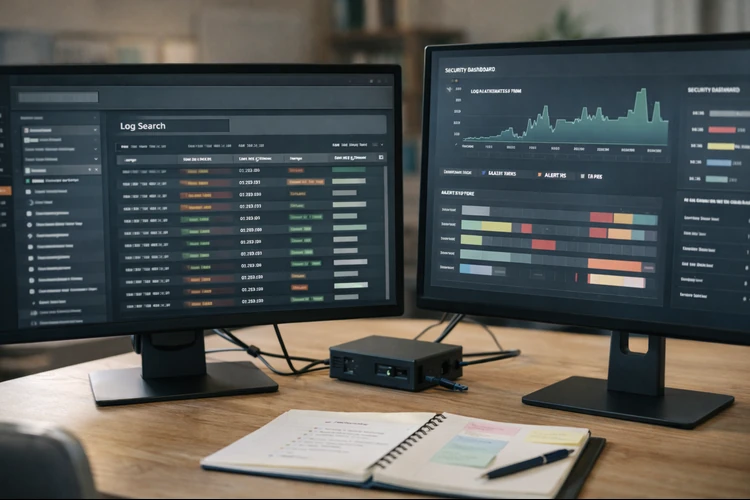
A beginner SIEM project is one of the highest-signal things you can do. You'll practice collecting logs, searching them, creating dashboards, and defining basic alerts.
This mirrors real SOC work. Entry-level analysts spend time investigating authentication events, process activity, and unusual patterns across endpoints. Build this in a safe home lab using a VM as your log server and 1 to 3 endpoints as log sources.
You can use Wazuh, Elastic/OpenSearch, or any log pipeline you can set up reliably. Start by enabling meaningful telemetry. For Windows, Sysmon is a popular choice for richer endpoint events, while Linux can use auth logs and audit logs. Create two or three dashboards that tell a story. A simple "Login Activity" dashboard and a "Suspicious Admin Activity" dashboard already shows strong fundamentals.
Add two beginner alerts that are defensible and easy to explain. Examples include multiple failed logins in a short period or a newly created admin user. Publish screenshots of dashboards and the alert logic. Then write a short detection note explaining why it matters, what false positives look like, and how you'd tune it.
Portfolio deliverables: architecture diagram, dashboard screenshots, alert rules, and a 1-page detection write-up.
2) Phishing Triage Toolkit: Email Headers, URL Checks, Clear Decisions
Phishing remains one of the most common threats businesses face. Junior security roles often include sorting suspicious emails and deciding what to escalate.
This project is high signal because it shows process and communication. It also proves you can make decisions under uncertainty using evidence. Build a phishing triage checklist that someone non-expert can follow. Include items like sender domain mismatch, Reply-To mismatch, and signs of spoofing.
Create a simple URL risk checklist too. Focus on readable indicators such as strange subdomains, misspellings, and suspicious redirects, rather than "magic tools." Add a decision tree that ends in action. For example: "Safe -> Close," "Suspicious -> Warn user," "Malicious -> Block domain and escalate."
Optionally, write a small Python script that parses email headers into a cleaner summary. Even basic extraction of From/Return-Path/Reply-To looks impressive when documented well. Write two or three sample triage reports using public sample emails or test emails you send to yourself. Keep all data sanitized and avoid sharing sensitive personal details.
Portfolio deliverables: triage playbook, decision tree, sample reports, and optional header parser script.
3) Vulnerability Management Cycle: Scan, Prioritize, Fix, Validate
Running a scanner is easy. Understanding results and driving remediation is what employers actually need. This project proves you can prioritize risk instead of drowning in findings. It also shows you understand the "fix and verify" loop vulnerability programs rely on. Choose assets you own, like your laptop and a VM. Use a reputable vulnerability scanner and export results for analysis.
Create a prioritization rubric that goes beyond severity. Include exposure (internet-facing vs local), exploitability, and business impact assumptions. Pick your top five issues to remediate and explain why you chose them. Then implement fixes like updates, configuration changes, or removing unnecessary services.
Rescan and document the before/after difference. Show what improved and note any findings that remain, including why they couldn't be fixed yet. Present your work like a professional report. Include an executive summary, a prioritized table, and a short remediation plan.
Portfolio deliverables: sanitized vulnerability report, remediation tracker, and before/after validation evidence.

Safety note: Only scan systems you own or have explicit permission to test.
4) Incident Response Playbook + Tabletop Exercise
Incident response is not just technical. It's about coordination, steps, evidence, and communication under pressure. A strong IR playbook shows you can be calm and structured. It also demonstrates you understand what to collect and how to reduce damage fast.
Pick one realistic scenario like account takeover or ransomware. Keep it simple, and focus on what a junior analyst would actually do first. Write your playbook in clear sections: detection signals, containment, evidence collection, escalation, and recovery. Add a short section on communications and who to notify.
Then run a tabletop exercise using a scripted timeline. Write "injects" like a suspicious MFA prompt or a new admin account appearing. Finish with an after-action report. Document what worked, what was unclear, and what you'd improve, such as adding better logging or clearer escalation paths.
Portfolio deliverables: IR playbook, flowchart, tabletop script, and after-action report.
5) Threat Modeling a Simple App Using STRIDE
Threat modeling is a powerful way to show systems thinking. It's especially valuable if you're interested in AppSec, security engineering, or product-aligned security roles. Choose a simple app like a to-do app with login or a booking site. You don't need a full product. You only need enough to define users, data, and trust boundaries.
Create a basic data flow diagram showing how information moves. Include the browser, app server, database, and any third-party services. Use STRIDE to identify threats: spoofing, tampering, repudiation, information disclosure, denial of service, and elevation of privilege. Keep it practical rather than exhaustive.
For each threat, propose a mitigation and a priority. You'll learn to trade off risk, cost, and complexity, which is what real teams do. Turn your mitigations into a security backlog. Add acceptance criteria so it reads like real engineering work, not a theory exercise.
Portfolio deliverables: data flow diagram, threat table, and prioritized security requirements backlog.
6) Security Hardening Baseline + Audit Script
Hardening is one of the most useful "day one" security skills. It shows you can translate best practices into concrete, repeatable actions. Pick a platform you're comfortable with, Windows or Linux. Create a baseline checklist covering updates, account security, firewall rules, and logging.
Write the checklist as if someone else must follow it without you. Clear steps and screenshots can turn a simple baseline into a portfolio standout. Then build a small audit script that checks a handful of settings. On Windows, PowerShell is ideal, while Bash works well on Linux.
Run the checklist and then run your audit script to verify the changes. Document any settings you avoided changing, and explain why, like compatibility or usability. This project is attractive to employers because it's realistic. Teams need reliable baselines for endpoints, laptops, and servers.
Portfolio deliverables: hardening checklist, audit script, and verification results.
7) Cloud Security Starter: IAM, Logging, Posture Findings
Cloud security is in demand, and you can build a credible beginner project using free tiers. The key is to work safely and control costs with budgets and alerts. Create a sandbox account and enable MFA immediately. Then set a budget alert so you don't accidentally generate charges.
Build a least-privilege IAM setup with a read-only auditor role and a limited developer role. Keep an admin account for emergencies and document how it's protected. Enable audit logging for your cloud platform. The goal is to prove you know where visibility comes from and how to investigate later.
Run a posture scan tool appropriate to your cloud provider and export findings. Choose a few low-risk fixes, implement them, and re-run to show improvement. Document your approach like a mini cloud security baseline. That baseline is often more important than the tool you used.
Portfolio deliverables: IAM explanation, logging proof, posture report summary, and before/after improvements.
8) Secure Dev Workflow Demo: CI Security Checks in a Small Repo
Modern security increasingly lives inside software delivery. Showing you can add security checks to CI is a huge signal for AppSec and DevSecOps pathways. Create a tiny app repo or use a simple starter project. Your goal is not the app itself. It's the security workflow around it.
Add a CI pipeline that runs on every pull request. Include dependency scanning, secret scanning, and basic code scanning where supported. Document what each check catches and what it doesn't. This honesty builds credibility and shows you understand limitations.
Add a contributor security checklist that explains how to handle secrets, how to update dependencies, and what reviewers should check. Even for beginner candidates, this project stands out because it resembles how real teams prevent issues before production.
Portfolio deliverables: CI config file, screenshots of checks, and a "security workflow" write-up.
How to Make These Projects Look Professional on GitHub
Your portfolio should be easy to skim. Most reviewers won't read every line, but they will judge organization, clarity, and evidence.
Create a pinned "Cybersecurity Portfolio" repo that links to your best 3 to 5 projects first. Add one sentence under each link explaining what it proves.
Use consistent naming and formatting across repos. When every project has the same structure, you look like someone who can work in a process-driven environment.
Add short visuals whenever possible. A simple architecture diagram, a dashboard screenshot, or a flowchart can do more than paragraphs of text.
Where Code Labs Academy Fits (Without Guesswork)
Many career changers struggle not because they lack motivation, but because they lack structure and feedback. Security has many paths, and it's easy to build projects that don't match hiring needs.
A structured program like Code Labs Academy's Cyber Security Bootcamp can help you build job-ready skills in a guided way, develop a portfolio that maps to real roles, and get dedicated Career Services support.
If you want a clear roadmap, you can explore our bootcamps, talk to an advisor, or review the curriculum on the bootcamp page. If you have a quick question first, you can also reach the team via Contact Us.
Conclusion: Build Signal, Not Noise
You don't need risky demonstrations to stand out in cybersecurity. You need proof you can detect, document, prioritize, and communicate.
Pick one project from this list and finish it end-to-end. Publish clean evidence, explain your decisions, and share what you'd improve next.
When you're ready to move faster with structure, feedback, and career support, explore Code Labs Academy programs or apply here to take the next step toward your first cybersecurity role.

Learn technical skills online with Code Labs Academy
Join our supportive community, unlock your potential, and embark on a rewarding career path.
Apply Now