
How AI Coding Assistants Change Bootcamp Learning in 2026 (and What You Still Need to Learn)
Updated on January 15, 202614 minutes read
If you're thinking about switching into tech, you've probably noticed a big shift: coding no longer happens in a "blank editor" world. Today's learners write code alongside smart assistants that can suggest solutions, explain errors, and speed up repetitive work.
That creates a fair worry for career changers. If a tool can generate code, what's left for you to learn, and what will employers actually test when you apply for your first role?
This article is for adults considering an online bootcamp and aiming for a real job outcome. You'll learn how bootcamp learning changes in 2026, how to use coding assistants without getting stuck, and which fundamentals still separate job-ready juniors from "tutorial-only" learners.
Why 2026 feels different for bootcamp students
In 2026, coding assistants will be built into most developer workflows. They're not a novelty anymore; they're part of how modern teams ship features, fix bugs, and document systems.
For learners, that's both a shortcut and a trap. You can move faster than ever, but you can also skip the exact thinking that interviews and real jobs depend on. The result is a new learning reality. Bootcamp success isn't about memorizing syntax; it's about building judgment, reliability, and confidence under real constraints.
What AI coding assistants actually change in day-to-day learning
Coding assistants are strongest when your task is common and well-structured. They're great at producing "first drafts" of code that look correct at a glance. That means beginners spend less time fighting setup friction. You can scaffold a project, generate boilerplate, and get to a working screen faster than students could a few years ago.
But speed changes your responsibilities. When code appears quickly, your job becomes verifying, improving, and explaining it, because "it runs" is not the same as "it's correct, safe, and maintainable."
Faster starts: scaffolds, boilerplate, and setup help
Many learners used to lose hours on environmental issues. Version mismatches, confusing error logs, and missing dependencies could derail a whole weekend.
In 2026, assistants can often help you diagnose setup problems faster. They can suggest the right install commands, explain a build error, or point out a missing environment variable. That's a real advantage, especially for busy adults learning around work and family. It reduces the "I'm stuck before I even begin" problem.
More output: more code to review, test, and own
The flip side is volume. You may generate more code than you can comfortably review if you aren't careful.
This is where learning can quietly break. If you accept code you can't explain, you lose the ability to debug it later, and you'll feel that pain during interviews and capstone projects. In 2026, learning to code includes learning to audit code. You're not just a writer; you're a reviewer, tester, and decision-maker.
What coding assistants do well (and where they still fail)
It helps to know what these tools are good at, so you can use them strategically. You don't want to treat them like magic, and you don't want to ignore them either. Think of them as a powerful teammate who's fast, but sometimes overconfident. Your job is to supervise the work.
What they do well in 2026
They commonly do well with predictable tasks. Examples include generating a CRUD endpoint, drafting a form component, or converting a loop into a cleaner function.
They're also strong at explaining concepts in simpler language. If a stack trace is confusing, an assistant can help you interpret what's actually happening.
They can accelerate refactoring, too. If your code is messy, they can propose structure, naming, and extraction into smaller functions.
Where they still struggle (the "junior trap")
Assistants often struggle witha messy reality. If requirements are vague, data is inconsistent, or the system has hidden constraints, generated code may be plausible but wrong.
They can also miss subtle edge cases. A validation rule might fail for unusual inputs, or an API handler might break under concurrency or unexpected payloads. And they can produce insecure patterns if you don't know what to look for. That's why foundational knowledge still matters; it's your safety filter.
How bootcamp learning changes in 2026
Bootcamps aren't becoming "easier." They're becoming closer to real-world work because modern work includes assistants. A good coding bootcamp adapts by shifting assessment away from memorization. The focus moves to reasoning, debugging, architecture, and communication.
Less emphasis on memorizing syntax
You still need to understand syntax, but you don't need to store every method name in your head. Professionals don't work that way, and students shouldn't either.
What matters is knowing how to find the right information and apply it. If you understand the concept, you can recover the details quickly. This frees time for greater skills. Instead of drilling trivia, you practice building complete systems and defending your decisions.
More emphasis on "explain, justify, verify.y"
In 2026, the strongest learners develop a habit: every time code is written (by you or a tool), you can explain why it's correct. That means you can describe what it does, what could break it, and how you tested it. You can also explain why you chose that approach over alternatives.
This is exactly what employers look for in interviews. They don't just want working code; they want predictable performance under uncertainty.
More realistic collaboration workflows

Modern bootcamps increasingly teach workflows that match professional teams. That includes Git branching, pull requests, code review comments, and clear documentation.
Assistants can speed up parts of the process, but they can't replace team habits. You still need to communicate changes, summarize decisions, and handle feedback calmly. If you learn collaboration early, your first job feels less like a shock. You'll already be practicing how teams actually ship.
What you still need to learn to become job-ready
Even with smart tools, there are skills you cannot skip. These skills are what turn "I can generate code" into "I can deliver outcomes." If you focus on these areas, assistants become a multiplier instead of a crutch.
1) Problem-solving and requirements thinking
Real tech work starts before code. You need to clarify what "done" means and what constraints matter. Practice turning vague ideas into clear requirements. Define inputs, outputs, edge cases, and acceptance criteria that you can test.
This skill is valuable across roles. Developers, analysts, security specialists, and designers all succeed by defining problems clearly.
2) Programming fundamentals and mental models
You don't need a computer science degree, but you do need strong fundamentals. Without them, you can't judge whether the generated code is correct.
Make sure you understand data types, control flow, functions, and how data moves through a program. Learn how arrays, objects, and common data structures behave. These basics help you debug faster, write cleaner code, and recognize bad patterns immediately.
3) Debugging as a core skill (not an afterthought)
Debugging is the skill that makes you employable faster than almost anything else. It's also the skill most beginners avoid until it becomes painful.
Learn how to reproduce a bug reliably, isolate variables, and confirm causes with evidence. Use logs, breakpoints, and small experiments instead of guessing. In 2026, this is the difference between "I built it once" and "I can maintain it." Employers hire for the second one.
4) Testing and validation
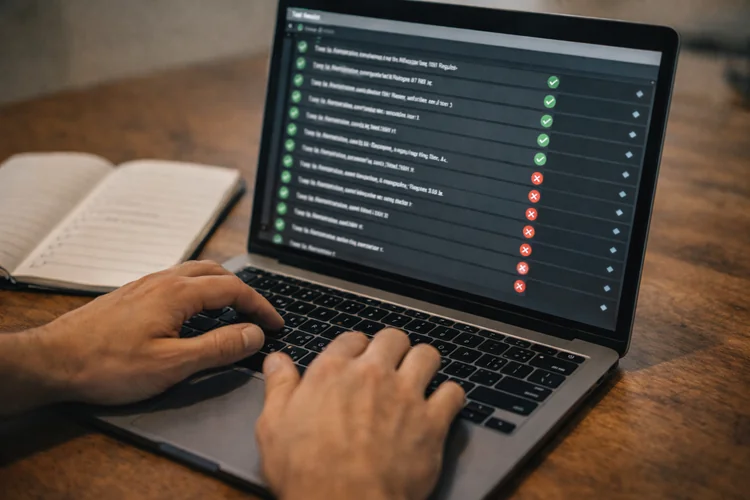
Assistants can generate code quickly, but testing is how you prove it works. Testing is also how you keep moving when a project grows.
At minimum, learn unit testing for core logic and integration testing for APIs. Learn how to write test cases for edge conditions and failure paths. Even simple tests send a strong signal in your portfolio. They show you care about reliability, not just demos.
5) System understanding: frontend, backend, and data flow
Most real products are systems, not isolated scripts. You need to understand how the frontend, backend, and database connect. Learn HTTP fundamentals, authentication basics, and common API patterns. Understand how databases store and retrieve data, and why schema design matters. When you can explain the system end-to-end, you become much easier to trust as a junior hire.
6) Security basics that prevent embarrassing mistakes

Security is no longer "advanced-only." Junior developers are expected to avoid obvious risks. Learn input validation, safe authentication patterns, and how to manage secrets. Understand common web vulnerabilities like injection and cross-site scripting. Even one secure-by-default habit can protect your future team. It also helps you stand out in interviews.
7) Communication and teamwork habits
Most entry-level candidates underestimate how much communication matters. In reality, clear communication is one of the fastest ways to stand out.
Practice writing good commit messages and explaining changes in pull requests. Practice describing tradeoffs without getting defensive. If you can communicate clearly, your technical growth is easier to support, and mentors want to work with you.
How to use coding assistants without sabotaging your learning
The goal isn't to avoid assistants. The goal is to use them in a way that strengthens your skills instead of hiding gaps. If you train with the right workflow, you'll learn faster and retain more.
Use a "Plan -> Draft -> Verify" routine
Start by writing a plan in plain English. Include what the feature should do, what data it needs, and how you'll test it. Then draft the code, using an assistant if you want. Keep the scope small so you can review it properly.
Finally, verify it thoroughly. Run it, test edge cases, break it on purpose, and refactor it until you can explain it confidently.
The "explain-back" rule
Any time you add code, practice explaining it back without reading it line-by-line. Describe the purpose, the flow, and the tricky parts. If you can't explain it, you don't own it. That's the moment you slow down, re-read, and learn what's missing. This habit is incredibly interview-friendly. It trains you to think out loud and communicate clearly.
Ask assistants for options, not answers
Instead of asking for "the solution," ask for alternatives and tradeoffs. This shifts you from copy/paste mode into decision mode. Ask questions like, "Give me two approaches and compare pros and cons." Ask, "What edge cases could break this?" That builds judgment, which is exactly what junior roles require in 2026.
Schedule "assistant-off" practice blocks
To become confident, you need some practice without help. Otherwise, your brain never builds the retrieval and problem-solving muscle. Try short weekly sessions where you code without assistance. Use official docs and your own notes, then reflect on where you got stuck. This makes interviews less stressful. You won't feel lost when the tool isn't available or when the task is unfamiliar.
How bootcamp assignments evolve in 2026
Bootcamps are adjusting how they design projects, quizzes, and assessments. They want to measure understanding, not tool usage. That means assignments are more likely to test process and reasoning.
More "debug this" and "refactor this" tasks
You may be given code that works poorly or fails in subtle ways. Your job is to diagnose, fix, and explain. These tasks are realistic because most junior jobs involve improving existing code. They also reveal whether you truly understand what you're doing. This is where assistants can help, but only if you drive the investigation. You still need to form hypotheses and confirm them.
More emphasis on documentation and decision-making
In 2026, strong bootcamps increasingly require solid READMEs and decision notes. That's because employers value developers who leave clarity behind them. You may be asked to write a short "Engineering Decisions" section. You'll explain why you chose a database model, an API structure, or a UI pattern. This is excellent interview prep. It trains you to speak like someone who can work on a team.
More realistic capstone expectations
Capstones often become closer to "small products." You might need authentication, a database, a deployed app, and a usable interface. The standard shifts from "I built a demo" to "I built something stable." That includes basic testing, error handling, and a clear setup guide. A well-built capstone becomes a portfolio centerpiece. It's also a practical story you can tell in interviews.
What a strong portfolio looks like in 2026
A portfolio still matters, but the evaluation is sharper. Hiring managers know code can be generated, so they look for proof of ownership and reliability. Your projects should show that you can build, explain, and maintain.
What to include in a 2026-ready portfolio project
Start with a clear problem statement. Explain who it's for and what pain it solves. Show clean structure, readable code, and sensible naming. Include error handling and validation so the project doesn't fall apart on unexpected inputs. Add tests for key logic or endpoints, even if the test suite is small. A few good tests are better than none.
Documentation that actually helps
A strong README is part of your product. It should help someone run the project quickly without guessing. Include setup steps, environment variables, and common troubleshooting. Add a short "Roadmap" so reviewers see how you think about future improvements.
If you can, include screenshots or a short demo link. Make it easy for someone to understand value in 60 seconds.
A simple but powerful differentiator: decision notes
Add a short section called "Engineering Decisions." Keep it honest and practical. Explain what you optimized for, what tradeoffs you accepted, and what you'd do next if you had more time. This shows maturity. It also gives interviewers great prompts to ask you about, on your terms.
How these tools impact other bootcamp paths

Not everyone is aiming for full-stack development. Coding assistants also affect learning in Data Science & AI, Cybersecurity, and UX/UI Design.
The pattern is the same: faster output, higher expectations for thinking.
Data analytics and data science
Assistants can help you draft SQL queries, write Python boilerplate, and speed up notebook workflows. They can also help you summarize findings more clearly. But you still need data judgment. You must know how to clean messy data, check assumptions, and avoid misleading conclusions.
In 2026, employability depends on turning data into decisions. That means clarity, accuracy, and communication, beyond code.
Cybersecurity
Assistants can help explain commands, draft scripts, and outline procedures. They can also speed up learning by clarifying unfamiliar concepts. But security work relies on mindset, not just syntax. You need to think in terms of threats, risks, and real-world failure modes. You also need discipline with sensitive info. In cybersecurity, "convenient" mistakes can become serious incidents.
UX/UI and product design
Assistants can speed up ideation, microcopy drafts, and component documentation. They can also help you explore different UI patterns quickly. But design still depends on research and evidence. You need to understand user needs, accessibility, and usability testing.
In 2026, the best designers combine fast iteration with strong reasoning. The tool helps you move, but you set the direction.
What employers will test in 2026
Hiring managers are adapting, too. They're not panicking about assistants; they're updating what "proof of skill" looks like. That means interviews and take-home tasks will focus more on process.
The signals that still matter most
Employers still want to know if you can explain your work. They want to see how you reason about tradeoffs and edge cases. They also care about debugging, because that's where juniors often struggle. If you can methodically diagnose problems, you're immediately useful.
Finally, they look for collaboration readiness. Clear communication, good Git habits, and calm responses to feedback make you easier to hire.
Expect more practical, scenario-based evaluation
You may be asked to fix a broken feature, improve performance, or add tests. You may also be asked to explain an architectural choice. These tasks can't be faked by output alone. They require understanding and ownership. If you train for verification and explanation, you'll be prepared, even when the task is unfamiliar.
How Code Labs Academy supports modern bootcamp learning
In an assistant-first world, the best training programs help you build speed and skill. They teach you how to use modern tools while still developing fundamentals that employers trust.
Code Labs Academy bootcamps are designed to help learners become job-ready through structured, hands-on learning. You build practical skills, create portfolio projects, and get guidance that strengthens your reasoning, not just your output.
You also benefit from career support that matters when you're changing paths. That includes mentoring, feedback, and job-search preparation so you can present your skills confidently.
If you're comparing options, consider a simple next step: explore the curriculum on the bootcamps page. You can also schedule a call to map your goals to the right program path.
A practical learning roadmap for 2026 bootcamp students
If you want a straightforward plan, focus on phases. Each phase builds the skills that make assistants helpful rather than harmful.
Phase 1: Foundations and confidence
Learn core programming concepts and Git. Build small projects that force you to practice logic, not just setup. Get comfortable reading errors. Treat debugging as normal, not as failure. This phase is about becoming steady. Speed comes later.
Phase 2: Build complete features end-to-end
Start building features that touch an API, a database, and a UI. Learn how data moves across the system. Practice validation and error handling early. Don't wait until the last week to "make it robust." Write simple tests for critical paths. You're training future-you to move faster safely.
Phase 3: Portfolio polish and interview readiness
Turn one project into something you'd be proud to demo. Improve readability, structure, and documentation. Prepare stories about your decisions. Explain tradeoffs, mistakes, and how you fixed them. This is where you become hireable. Your portfolio becomes proof, and your communication becomes leverage.
Conclusion: assistants speed you up, but fundamentals get you hired
In 2026, coding assistants can accelerate learning, especially for adults balancing busy schedules. They help you start faster, explore options, and reduce friction when you get stuck.
But employability still depends on what you understand and can defend. Problem-solving, debugging, testing, system thinking, and communication remain the skills that separate job-ready juniors from copy/paste learners.
If you want a structured path to build those skills, explore a program that emphasizes real projects, portfolio ownership, and career preparation. Explore Code Labs Academy bootcamps and Apply when you're ready to start building job-ready skills with guidance and support.
Learn technical skills online with Code Labs Academy
Join our supportive community, unlock your potential, and embark on a rewarding career path.
Apply Now