
Find a Part-Time Data Science Course on Kursnet (2026 Guide)
Updated on January 19, 2026 5 minutes read
Kursnet is a course and training search portal run by Germany's Federal Employment Agency (Bundesagentur für Arbeit). It helps people find Weiterbildung (continuing education) offers and compares provider listings.
Kursnet is especially useful if you want a part-time course and need to filter by time commitment, delivery format (online or on-site), or location. The exact layout can change over time, but the search-and-filter flow stays similar.
Why choose part-time for data science
Part-time programs are built for people who cannot step away from work, family, or other responsibilities. Instead of compressing everything into full-time weeks, you study in a steadier rhythm and keep your routine intact.
Part-time also helps reduce risk when changing careers. You can learn, build projects, and explore the field while staying employed, which matters in data science where practice time is as important as lectures.
Step-by-step: how to search Kursnet for part-time data science
Kursnet's interface may look different in 2026 compared to older screenshots. Use these steps as a map: open the portal, run a focused search, then narrow results with filters and open listings to confirm details.
Step 1: Open Kursnet and go to Weiterbildungen
Start at Kursnet's official entry point and look for the training area (often labeled "Weiterbildungen"). This ensures you are searching within continuing education offers, not unrelated categories.
Kursnet homepage: arbeitsagentur.de/kursnet

Step 2: Open the course search
On the Kursnet start page, find the search bar or course search entry. This is where you enter your topic and then refine the results with filters.

Step 3: Search with clear keywords
Use keywords that match how providers describe programs. "Data Science" is a Good start, and adding "Teilzeit" (part-time) can help surface the right format faster.
If you prefer location-based options, add a city or region. If you want remote learning, prioritize format filters that indicate online delivery instead of relying only on keywords.

Step 4: Narrow results with filters
Filters are where Kursnet becomes most useful. In the left column (or a filter panel), refine results by delivery format, duration, start date, and time commitment.
If you plan to fund the course with a Bildungsgutschein (education voucher), use the funding-related filter if available, and then confirm eligibility on the course detail page. Do not assume a course is eligible without checking.

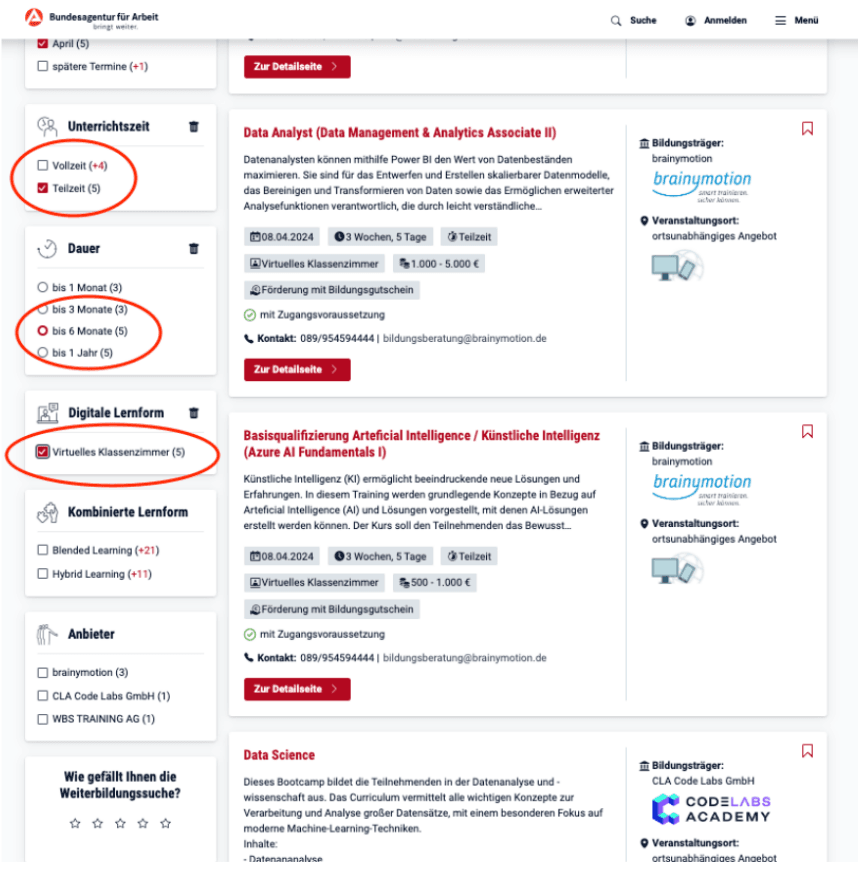
Step 5: Open listings and compare the details
Click into courses that look relevant and read each listing carefully. Focus on schedule (part-time hours), expected workload, prerequisites, and what support is included (mentoring, projects, and career support).
When comparing multiple offers, record the same fields each time: weekly hours, delivery method, language of instruction, and funding notes. This makes the final decision faster and clearer.
Step 6: Confirm Bildungsgutschein details before enrolling
If you plan to use a Bildungsgutschein, look for an explicit indication in the Kursnet lists that the offer supports voucher funding. Then confirm directly with the provider and your responsible office (typically Agentur fuer Arbeit or Jobcenter), because approval depends on your personal situation.

Step 7: Follow the provider's enrollment steps
Once you choose a course, follow the enrollment steps provided by the course provider. If you are using a voucher, expect additional paperwork and approval steps before a start date is confirmed.
If anything is unclear (for example weekly schedule, prerequisites, or required equipment), contact the provider before committing. It is easier to clarify upfront than to switch programs later.
Find Code Labs Academy's part-time Data Science course on Kursnet
Code Labs Academy offers a Data Science curriculum covering core topics such as data analysis, machine learning, and data visualization. If you plan to use a Bildungsgutschein, check the listing for any funding indication, and confirm the requirements with the relevant office.
Use the direct listing link below to review the current details on Kursnet: View Code Labs Academy on Kursnet
If the direct link changes or becomes temporarily unavailable, search Kursnet for "Code Labs Academy" and then apply the same part-time and funding filters. This usually gets you to the right listing quickly.
If you want an overview of the program before applying, see our official course page: Data Science and AI Bootcamp
A quick checklist before you enroll
Use this checklist to avoid surprises once the course starts:
- Schedule: Confirm weekly time blocks and whether they match your work hours.
- Format: Online, in-person, or hybrid, and what tools you need at home.
- Prerequisites: Any expected math, statistics, or programming background.
- Support: Mentoring, office hours, and how feedback works on projects.
- Funding: If using a voucher, confirm eligibility and keep written proof.
Next step: shortlist three options
A reliable workflow is to shortlist three courses that match your schedule first, then compare curriculum depth and learning support second. This helps you avoid choosing a strong syllabus that does not fit your week.
Open Kursnet, run your search, apply filters, and evaluate your shortlist using the checklist above. When you are ready, you can also jump directly to the Code Labs Academy listing via the Kursnet link at the top of this article.